Canvas Support
Canvas is Skyline College’s primary learning management system (LMS). Use this page to request course setup support, find help for technical or instructional questions, and access Canvas resources.
Course Setup Requests
Use these options for common course setup requests.
Request a Course Shell
Create a blank Canvas course for development, training, or a project.
Request course shell →Combine Course Sections
Merge multiple sections into one Canvas course to manage content in a single space.
Request Canvas sections merge →Choose the Right Support Option
Use the support option below based on the type of issue you are experiencing.
Contact ITS for issues related to account access, passwords, or district technology systems.
- OneLogin password issues
- Canvas login problems
- Computer or Wi-Fi issues
- District system access support
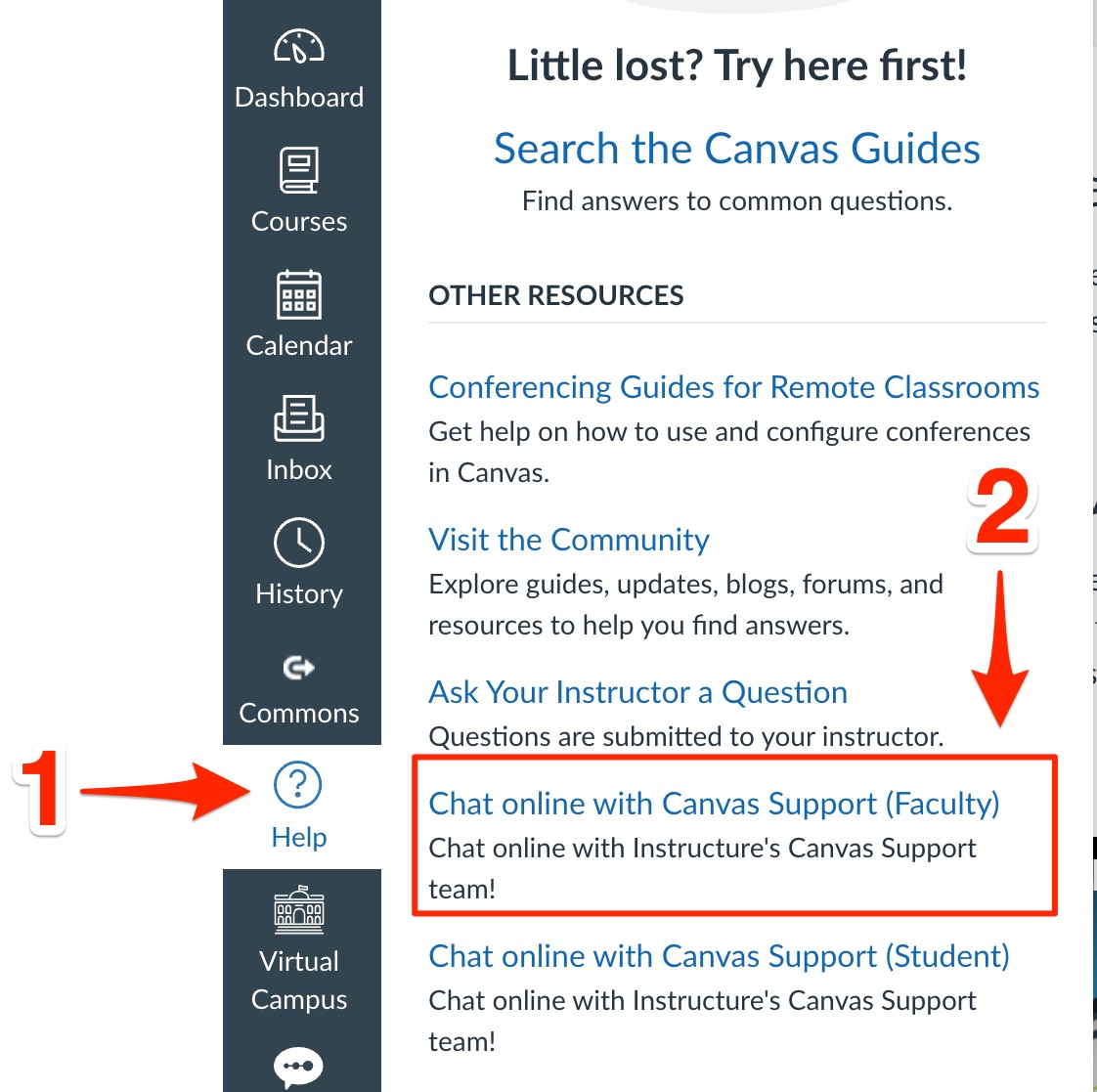
Use Canvas Support when Canvas is not functioning as expected and the issue appears
to be system-related. Canvas Support is available 24/7 through the Help option in
Canvas’s left navigation menu.
Use Canvas Support for issues such as:
- Error messages within Canvas
- Features or pages failing to load properly
- Unexpected platform behavior
- System-related issues that appear outside normal course setup
- Select "Help" in the left navigation on Canvas
- In the list of "other resources", select "Chat online with Canvas Support (Faculty)"
Submit a Canvas Instructional Support Request→ for help with teaching and managing your course in Canvas, including:
- Course setup and organization within Canvas
- Assignments, quizzes, modules, and gradebook setup
- Using Canvas features and tools
- Importing course content
- Basic course troubleshooting
- Support for instructional tools integrated with Canvas (such as Padlet, Panopto, WeVideo, Nectir AI, and other supported tools)
Explore Canvas Resources
Please review the resources below before submitting an instructional support request. Many common Canvas questions can be resolved through these guides and troubleshooting resources.
Explore guides and tutorials for course setup, troubleshooting, accessibility, and everyday Canvas tasks.
Canvas LMS Basics Guide
Find short tutorials for course setup, modules, assignments, grading, and communication.
Explore Canvas LMS Basics Guide→
Canvas LMS Instructor Guide
Use the official Canvas guides for step-by-step instructions on common Canvas tools
and settings.
Explore Canvas LMS Instructor Guide →
Canvas Course Troubleshooting Guide
Use this guide to troubleshoot common Canvas issues related to course content, links,
settings, and student access.
Explore Canvas Course Troubleshooting Guide →
Canvas Course Accessibility Checklist
Review accessibility best practices for Canvas pages, documents, images, links, and
course materials.
Explore accessibility options →
Still need help?
If the resources above do not address your question, choose the support option that works best for your needs.
Submit Instructional Support Request:
For troubleshooting questions, tool requests, or non-urgent support needs.
Submit Request →Schedule Time with an Instructional Technologist
For one-on-one guidance, course planning, or questions that would be easier to discuss live.
Schedule Appointment →